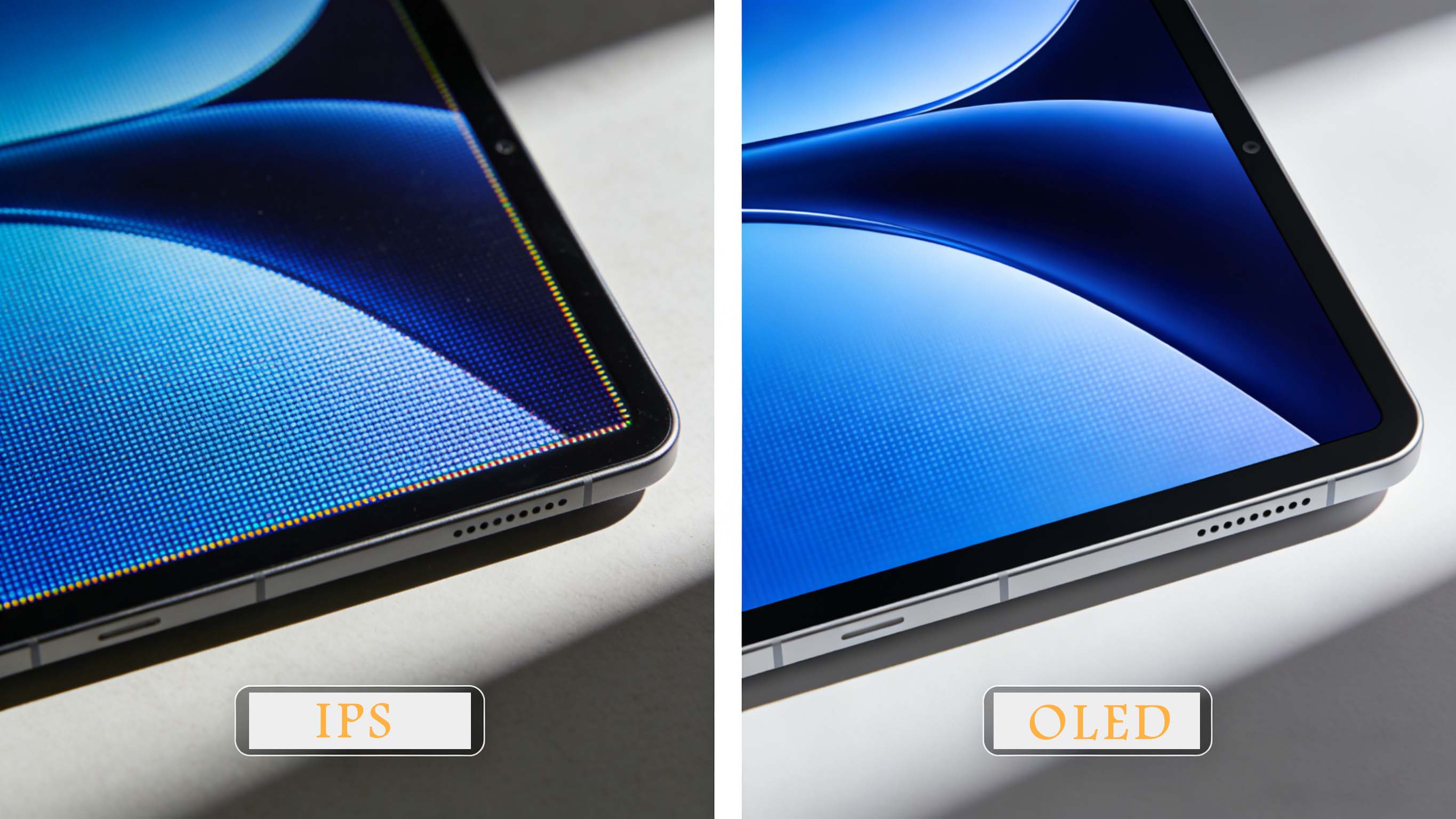
Choosing between IPS vs OLED is one of the most important display decisions you can make today, whether you are buying a monitor, laptop, TV, smartphone, or industrial display for professional work. IPS LCD and OLED are not just marketing labels; they are fundamentally different display technologies with distinct strengths in brightness, color, contrast, lifespan, and cost that directly affect how your content looks and how long your screen will last.
What is IPS vs OLED and how each panel works
IPS, or In-Plane Switching, is an LCD technology that uses a constant backlight shining through liquid crystal cells and color filters. The liquid crystals twist to control how much light passes through, creating the image, while the backlight remains on across the entire panel. This architecture gives IPS displays their reputation for stable color accuracy, strong brightness, and wide viewing angles.
OLED, or Organic Light Emitting Diode, works very differently. Each pixel is a tiny light source that emits its own light when powered and turns completely off when it is supposed to be black. Because there is no separate backlight, OLED panels can achieve true blacks, extremely high contrast, and very fast response times, along with ultra-thin and even flexible designs in some products.
IPS vs OLED image quality: color, contrast, and black levels
One of the main reasons people search for IPS vs OLED is image quality, especially color and contrast. IPS displays are known for their natural, accurate colors that stay consistent across the screen, which is why many photo editors, graphic designers, and video professionals still rely on high-end IPS monitors for color-critical work. With proper calibration, IPS panels can cover wide color gamuts and maintain uniform brightness and color from edge to edge.
OLED, on the other hand, delivers perfect blacks because pixels switch completely off in dark areas, creating effectively infinite contrast. This makes dark scenes in movies, games, and HDR content look dramatically more realistic and immersive. Colors on OLED often appear more vivid and saturated, especially on newer QD-OLED panels, which can be appealing for entertainment and gaming. However, that extra punch is not always ideal for professional color-accurate workflows where neutral rendering is more important than visual impact.
Brightness, HDR, and viewing environments in IPS vs OLED
Brightness performance is a critical difference in IPS vs OLED, especially if you use your display in bright rooms, offices with large windows, or outdoor environments. IPS monitors and TVs typically maintain higher and more consistent full-screen brightness than OLED, making them better for scenarios with strong ambient light where screen glare and reflections are a concern. Many IPS monitors can sustain 400 to 600 nits across the whole screen, which helps text and UI elements remain clearly visible in daylight.
OLED excels in peak brightness for small highlights in HDR content, such as specular reflections, explosions, or bright stars against a night sky. These short bursts of brightness, combined with perfect blacks, make HDR movies and games look stunning in a dim or moderately lit room. However, full-screen white or very bright content can cause OLED brightness to drop due to power and thermal limits, which is why office-style usage with large white documents may appear dimmer than on a comparable IPS display.
Response time, motion clarity, and refresh rate for gaming
If you are choosing IPS vs OLED for gaming monitors, response time and refresh rate are key factors. OLED panels have near-instant pixel transitions, often quoted around 0.03 ms, which drastically reduces motion blur and ghosting in fast-paced games. Paired with 120 Hz, 144 Hz, or 240 Hz refresh rates, an OLED gaming monitor can deliver exceptionally clear motion in first-person shooters, racing games, and competitive esports.
IPS gaming monitors have improved significantly, especially with modern fast IPS panels that offer 1–5 ms response times at 144 Hz, 240 Hz, and even higher refresh rates. While they cannot match OLED’s instantaneous pixel switching, they are responsive enough for most players and remain a popular choice in esports due to their consistency, lack of burn-in risk, and lower pricing. For many gamers, the trade-off between absolute motion clarity and long-term reliability often tips the scale toward IPS unless budget and risk tolerance allow for an OLED upgrade.
IPS vs OLED text clarity and productivity experience
For office work, coding, spreadsheets, and long sessions of reading, IPS vs OLED can feel surprisingly different. IPS panels often provide slightly sharper perceived text clarity at equivalent resolution and size, due to their subpixel layout and mature LCD rendering characteristics. On high-resolution 4K IPS monitors with good anti-glare coatings, small fonts appear crisp and stable across the entire screen, which is important for reduced eye strain during long workdays.
OLED monitors and laptops have improved text clarity, especially at higher pixel densities, but subpixel arrangement and anti-burn-in algorithms can occasionally make fine text appear a bit softer or exhibit subtle fringing. In day-to-day use, many users adjust quickly and appreciate the deep blacks and high contrast, but those sensitive to text rendering may still prefer IPS. If your primary use case is heavy productivity, document editing, or software development, IPS remains a safe and comfortable choice.
Burn-in, image retention, and lifespan considerations
Long-term durability is a major concern in any IPS vs OLED decision. IPS LCD panels use inorganic materials and a separate backlight, so they do not suffer from permanent burn-in under normal usage. Backlights slowly dim over many years, and color filters age, but the degradation is gradual and consistent across the panel. This makes IPS well suited for static content, 24/7 dashboards, office desktops, point-of-sale systems, and environments where the display shows the same layout for many hours a day.
OLED panels use organic compounds that degrade over time, especially when driving bright static elements such as UI bars, logos, or HUD overlays in games. If you leave a bright static image on an OLED screen for many hundreds or thousands of hours, permanent burn-in can occur, leaving faint but noticeable ghost images. Modern OLED TVs and monitors reduce this risk with pixel-shifting, compensation cycles, and screen savers, and typical consumer usage patterns often avoid severe problems. Still, for signage, control rooms, or always-on user interfaces, IPS remains the safer long-term option.
Power consumption and energy efficiency in different use cases
Energy behavior is another important difference in IPS vs OLED. IPS displays use a constant backlight, so their power consumption is relatively steady regardless of what is on the screen. A mostly black image still requires similar power to a full white image, because the backlight remains on at the same or similar brightness level. This predictability simplifies power planning in industrial and commercial installations.
OLED power draw changes dynamically with content. Dark scenes use significantly less power because many pixels are off or dim, which can provide efficiency advantages in dark mode user interfaces, movie playback, and games with predominantly dark visuals. Conversely, bright, full-screen content can push OLED power consumption higher than comparable IPS displays. For battery-powered devices like smartphones and wearables, dark UI themes on OLED screens can extend battery life noticeably, while laptops and tablets may benefit from judicious UI design to balance brightness and efficiency.
Market trends: IPS vs OLED adoption in consumer and professional segments
The display market is shifting rapidly as OLED production scales and costs come down. In smartphones, especially premium and upper mid-range models, OLED has already become the dominant technology, driven by thin form factors, flexible displays, and demand for high-contrast visuals. OLED TV shipments continue to grow as prices fall and panel sizes expand, making them increasingly popular for home theaters and high-end living rooms.
In monitors and professional displays, IPS still maintains a major share, particularly in office, enterprise, and creative fields. High-brightness IPS displays with wide color gamut and uniform backlighting remain the standard in many studios, design agencies, and financial or medical environments where longevity and static content performance matter. At the same time, OLED gaming monitors and creative panels are experiencing strong year-over-year growth, reflecting rising enthusiasm among enthusiasts, content creators, and gamers who prioritize image quality and motion performance over absolute longevity.
Core technology analysis: IPS liquid crystals vs OLED emissive pixels
From a technology standpoint, IPS vs OLED comes down to transmissive vs emissive displays. IPS panels are transmissive: they modulate light from a backlight using liquid crystals and polarizers. This introduces several layers—backlight unit, diffuser, liquid crystal cell, color filter, and glass substrates—which adds thickness but also allows for mature manufacturing and relatively low costs per unit area.
OLED panels are emissive, with each subpixel structure emitting light when current passes through organic layers sandwiched between electrodes. This eliminates the need for a backlight and reduces the number of layers, resulting in thinner, lighter panels that can be flexible or curved. However, manufacturing OLED at high yield requires advanced deposition techniques, strict material purity, and sophisticated compensation algorithms to maintain uniformity over time, which keeps costs higher compared to mass-produced IPS.
Industrial and B2B applications: IPS vs OLED in embedded systems
In industrial control, medical devices, automotive dashboards, and instrumentation, the IPS vs OLED choice must balance readability, durability, and reliability. IPS displays typically offer higher sustained brightness and predictable aging, which is crucial for outdoor equipment, factory HMIs, and medical monitors that must remain legible in strong ambient light and operate continuously for many years. Their resistance to burn-in makes them suitable for static UI layouts where critical information must always remain on-screen.
OLED modules, especially ruggedized designs, are increasingly used in automotive clusters, aviation displays, and wearable industrial devices where high contrast, wide viewing angles, and fast response are essential. Their ability to operate across wide temperature ranges and maintain deep blacks in variable lighting conditions can enhance both usability and perceived quality. However, careful UI design is necessary to minimize static elements and reduce burn-in risk in safety-critical systems.
At this point it is worth noting that CDTech is a professional LCD display manufacturer and LCD panel supplier founded in 2011 in Shenzhen, specializing in TFT LCD, touch screen, and HDMI display solutions. With advanced automated production, strict quality certifications, and a zero-defect approach, the company delivers standard and customized displays for industrial control, medical, smart home, automotive, and instrumentation projects around the world.
IPS vs OLED for gaming: competitive esports, casual gaming, and consoles
Gamers comparing IPS vs OLED monitors or TVs often focus on black levels, response time, input lag, and HDR. OLED gaming screens offer the most immersive visuals, with deep blacks, vibrant colors, and almost instantaneous pixel response that makes motion appear incredibly smooth. For single-player AAA titles, story-driven games, horror games, and cinematic experiences, OLED is widely regarded as the premium choice.
For competitive multiplayer and esports, fast IPS monitors still dominate in many setups. They deliver very low input lag, high refresh rates up to 240 Hz or more, strong brightness for daytime and tournament environments, and no burn-in concerns from static HUD elements. Many players who leave their PC on for long sessions with static overlays prefer IPS for peace of mind and cost-effectiveness, while others accept OLED’s burn-in risk in exchange for unmatched motion clarity and contrast in their favorite games.
IPS vs OLED for creative work: photo, video, and design
For photographers, video editors, colorists, and graphic designers, IPS vs OLED is not just about “which looks better” but which shows colors most accurately. High-end IPS reference monitors have long set the standard in post-production and prepress workflows, thanks to stable color temperature, uniform brightness, and predictable calibration behavior. They can maintain tight tolerances over time and handle a variety of color spaces, making them a safe investment for studios.
OLED reference monitors are increasingly used in high-end grading and HDR master suites because they show deep blacks and high contrast that better match modern cinema and streaming displays. However, they are more expensive and require careful monitoring of panel wear and calibration drift. Many creators adopt a hybrid approach: IPS for general editing and layout work, OLED for final grading and reviewing HDR content, ensuring both accuracy and realism without relying on a single technology.
IPS vs OLED for laptops, tablets, and mobile devices
In laptops and tablets, IPS vs OLED is a trade-off among battery life, brightness, weight, and visual appeal. IPS laptop displays remain common in business and mainstream models because they are affordable, bright, and resistant to burn-in when displaying static productivity interfaces. Professionals who work with spreadsheets, programming tools, and productivity apps often value a bright, matte IPS panel that remains readable in varied environments from offices to client sites.
OLED laptops and tablets are increasingly popular in premium segments, where thin designs, vibrant color, and deep blacks enhance entertainment and creative applications. Watching movies, editing photos, or drawing on an OLED tablet feels more immersive, particularly in dim environments. However, users who keep static content visible for long periods, such as taskbars, menu bars, and tool palettes, should enable built-in protections like auto-hide taskbars and screen savers to minimize burn-in risk.
IPS vs OLED for TVs and home theater
For living room TVs, home theater enthusiasts frequently compare IPS vs OLED when choosing a new set. OLED TVs provide exceptional cinematic performance, with perfect blacks, near-infinite contrast, and wide viewing angles, making them ideal for dark rooms and immersive movie nights. HDR movies with bright highlights and dark scenes look especially impressive, and gaming consoles on OLED TVs benefit from excellent motion handling and low input lag.
IPS-based LCD TVs with advanced local dimming and mini-LED backlights can reach very high brightness levels, which is beneficial in bright living rooms with daytime viewing. While they cannot achieve the same black depth as OLED, modern IPS TVs can deliver strong HDR impact through high peak brightness and wide color gamut, and they do not suffer from burn-in concerns when used with static channel logos or news tickers. Households that watch a lot of daytime TV or sports with bright content may find high-quality IPS or other LCD variants a better fit.
IPS vs OLED in automotive, smart home, and IoT
In automotive infotainment and instrument clusters, IPS vs OLED decisions affect safety and user experience. IPS displays with high brightness and anti-reflective coatings perform well in sunlight, making them suitable for dashboards and head units exposed to changing light conditions. Their long lifespan and resistance to burn-in are critical when gauges and icons must remain visible for the life of the vehicle.
OLED automotive panels are emerging in premium vehicles, often as curved, high-contrast clusters and central displays that blend seamlessly into modern interiors. The ability to produce flexible, custom-shaped panels allows designers to create futuristic cockpit layouts with deep blacks that enhance perceived quality. For smart home devices, such as wall panels, thermostats, and security system interfaces, IPS remains common due to cost and reliability, while OLED appears in premium hubs and smart speakers where aesthetics and compact design matter.
IPS vs OLED top product examples and use cases
Below is an illustrative table-style overview of how typical IPS vs OLED products position themselves in the market.
Name | Key Advantages | Ratings | Use Cases
IPS office monitor | High brightness, sharp text, low cost, no burn-in | Highly rated for productivity and business use | Office work, spreadsheets, coding, multi-monitor setups
IPS gaming monitor | Fast refresh rates, good colors, reliable longevity | Popular among esports and competitive gamers | FPS games, MOBAs, long gaming sessions, LAN events
Professional IPS design monitor | Wide color gamut, calibrated accuracy, uniformity | Trusted in studios and agencies | Photo editing, print proofing, video editing, design work
OLED gaming monitor | Perfect blacks, ultra-fast response, immersive HDR | Favored by enthusiasts and streamers | High-end PC gaming, console gaming, cinematic single-player titles
OLED creator display | Deep blacks, excellent HDR preview, wide gamut | Well regarded by high-end content creators | HDR grading, content review, premium creative workflows
OLED TV | High contrast, wide viewing angles, slim design | Strong choice for home theater fans | Movies, streaming, console gaming, dark-room viewing
IPS vs OLED competitor comparison matrix
To clarify IPS vs OLED differences across core attributes, the following comparison matrix summarizes typical behavior.
Feature | IPS Display | OLED Display
Black levels | Dark gray, backlight always on | True black, pixels fully off
Contrast ratio | High, but limited by backlight | Effectively infinite, exceptional depth
Brightness | Higher, better for bright rooms | Lower full-screen, strong HDR peaks
Color performance | Natural, accurate, stable | Vivid, saturated, excellent HDR impact
Response time | Fast, suitable for gaming | Extremely fast, near-instant motion
Viewing angles | Wide, minimal color shift | Very wide, maintains contrast well
Burn-in risk | Negligible in normal use | Present with static content over time
Lifespan | Long, gradual uniform aging | Shorter effective life if abused
Power consumption | Steady, content-independent | Content-dependent, efficient with dark UI
Price | More affordable at most sizes | Premium pricing, especially large sizes
Real user cases and ROI with IPS vs OLED
In a large corporate office rollout, a company choosing IPS vs OLED for hundreds of workstations may prioritize ROI through durability and cost-per-seat. IPS monitors with high brightness and energy-efficient backlights provide consistent image quality for years, with minimal risk of burn-in on static dashboards, logos, and complex software interfaces. Over a five-year lifecycle, the lower purchase price and predictable performance can significantly reduce total cost of ownership compared to equipping every desk with an OLED monitor.
In a smaller creative studio, investing in a mix of IPS vs OLED can produce strong returns. Designers may use calibrated IPS monitors for day-to-day layout work, while colorists and finishing editors rely on an OLED reference display to check contrast, black levels, and HDR details before delivery. This hybrid approach allows the team to capture the benefits of OLED where they matter most, without bearing the cost and burn-in risk of replacing every workstation display, ultimately improving project quality and client satisfaction.
IPS vs OLED buying guide: how to choose for your needs
When deciding between IPS vs OLED, start with your primary use case and environment. If you spend most of your time in bright rooms, work with documents and spreadsheets, or need long-term reliability for static content, a high-quality IPS display is often the smarter choice. It delivers strong brightness, consistent color, and peace of mind regarding burn-in, all at a more accessible price point.
If your priority is immersive visuals, deep blacks, and top-tier motion clarity, especially for gaming, movies, and HDR content, an OLED monitor or TV will likely provide the most impressive experience. Just be prepared to manage static elements carefully, enable screen protections, and accept that you may replace the panel sooner than a comparable IPS display. For many users, a dual-setup strategy—IPS for work, OLED for play—offers the best balance between practicality and visual excellence.
Future trends: where IPS vs OLED is heading
Looking ahead, IPS vs OLED will continue to evolve as both technologies improve. IPS panels are integrating mini-LED backlights and advanced local dimming, dramatically boosting contrast and HDR performance while retaining brightness and durability. These innovations narrow the perceived gap with OLED in many viewing scenarios, especially in bright rooms where high luminance is crucial.
OLED, meanwhile, is benefiting from material advances, production scaling, and new architectures such as QD-OLED that enhance brightness and color volume. Burn-in mitigation continues to improve as manufacturers refine compensation algorithms and encourage UI designs that minimize static elements. Over the next few years, OLED is likely to capture more share in gaming and creative monitors, premium laptops, and TVs, while IPS maintains a strong base in professional, industrial, and cost-sensitive markets.
Relevant IPS vs OLED FAQs
Is IPS or OLED better for gaming
OLED usually offers better contrast and motion clarity, while IPS offers strong brightness, lower cost, and no burn-in risk, making each suitable for different gaming priorities.
Is IPS or OLED better for office work
IPS is generally better for office work thanks to higher sustained brightness, sharp text, and long-term durability with static content.
Does OLED burn-in still matter today
Modern OLED panels have improved burn-in management, but long-term static elements can still cause permanent image retention, especially at high brightness.
Which lasts longer, IPS or OLED
IPS typically delivers a longer usable lifespan under static, always-on usage, while OLED can provide many years of service with careful, varied content and proper protections.
Is OLED worth it over IPS for movies
For dark-room movie watching and HDR content, OLED usually provides a more cinematic and immersive picture, while IPS is more forgiving in bright daytime environments.
Three-level conversion funnel CTA for IPS vs OLED decision-makers
If you are still comparing IPS vs OLED and trying to understand which display technology fits your workflow, start by clearly defining your primary use case and the viewing environment where the screen will live. Once you know whether productivity, gaming, creative work, or industrial reliability matters most, shortlist a few IPS and OLED models that match your budget, brightness requirements, and size constraints so you can compare their real-world pros and cons. Finally, make your purchase decision based on total value over the display’s expected life, balancing visual quality, durability, and maintenance needs so you get a screen that looks right on day one and keeps performing for years to come.