displays are widely used in industrial equipment, medical devices, smart home products, automotive systems, and embedded applications. While modern TFT LCD technology offers excellent image quality and reliability, display defects can still occur during manufacturing, assembly, transportation, or long-term operation.
Understanding the root causes of LCD display defects is essential for engineers, product designers, and procurement teams seeking to improve product quality and reduce maintenance costs.
This guide explains the most common LCD display defects, their causes, diagnostic methods, and effective prevention strategies.
What Are LCD Display Defects?
LCD display defects refer to visual abnormalities that negatively affect image quality, readability, or user experience.
These defects may originate from:
· LCD panel manufacturing processes
· Backlight assembly issues
· Mechanical stress
· Optical bonding defects
· Environmental conditions
· Aging components
· Improper installation
Some defects are cosmetic and acceptable within industry standards, while others may indicate significant reliability concerns.
Complete LCD Defect Troubleshooting Matrix
Defect Type | Typical Appearance & Symptom | Potential Root Cause | Diagnostic & Test Method | Recommended Action & Prevention |
Screen Bleeding | Light leakage or bright halos concentrated at display edges/corners, highly visible on dark backgrounds | Excessive bezel pressure, BLU frame tolerance stack-up, uneven structural compression. | Dark-room inspection under a 0% grayscale (solid black) test pattern. | Optimize mechanical enclosure design, implement standardized torque controls, use damping gaskets. |
White Spot | Localized, distinct bright areas visible on both dark and uniform light backgrounds | Foreign particle contamination within the display stack, optical film deformation, localized mechanical impact. | Visual inspection under a uniform white background (100% Iris). | Upgrade cleanroom class during touch-panel/BLU integration, optimize transit packaging. |
Ghosting / Smearing | Motion trails, blurring, or residual shadows trailing behind moving graphical elements. | Slow liquid crystal pixel response time, improper overdrive tuning, driver IC refresh limitations. | Motion pattern test (e.g., scrolling text or moving block patterns). | Fine-tune driver IC overdrive registers, select panels with faster native response times. |
Image Retention | Residual ghost image of a previously displayed static UI element remaining visible after switching screens. | Charge accumulation within the LC cell, liquid crystal polarization under prolonged electric field stress. | Static pattern burn-in test followed by full-black/full-white image toggling. | Implement pixel-shifting algorithms in the GUI, optimize driver IC Vcom voltage tuning. |
Dead Pixel | A single isolated sub-pixel that remains permanently black, white, or stuck on a fixed color. | TFT transistor short/open circuit, micro-particle contamination during thin-film photolithography. | Screen-filling solid red, green, blue, and white pattern inspection. | Perform screening and classification strictly according to ISO 9241-307 criteria based on application grade. |
Mura Effect | Cloud-like, low-contrast uneven brightness or non-uniform color distribution across the active area. | Cell-gap fluctuation, backlight LED binning inconsistency, external mechanical stress-induced birefringence. | Multi-point (9-point/13-point) luminance and chromaticity uniformity measurement. | Apply electronic optical compensation (De-mura), enforce strict backlight sorting, minimize enclosure twist |
Pressure Marks | Bright spots, dark patches, or localized rainbow patterns (Newton's rings) under external force. | Excessive mounting pressure, structural bending, improper touch panel or cover glass air-bonding integration. | Mechanical stress simulation, topology flat-bed inspection. | Adjust mechanical clearance (gap) between the bezel and the panel surface, utilize optical bonding (OCA/OCR). |
LCD Screen Bleeding
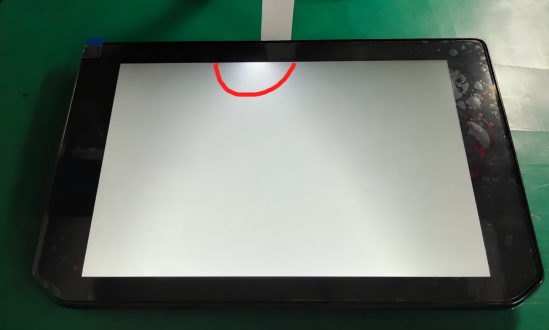
LCD screen bleeding occurs when excess light escapes around the edges or corners of a display, especially when showing dark images.
It is most noticeable in:
· IPS displays
· High-brightness LCDs
· Large-format TFT panels
Common causes include:
· Excessive bezel pressure
· Backlight assembly tolerances
· Uneven panel compression
· Mechanical deformation during assembly
Minor bleeding is generally considered acceptable within industry standards, while severe bleeding may require design optimization.
Related Guide:
→ LCD Screen Bleeding: Causes, Tests, Fixes & IPS Display Standards
White Spots on LCD Screens
White spots appear as localized bright areas visible on both dark and light backgrounds.
Common causes include:
· Pressure damage during assembly
· Improper transportation packaging
· Optical film deformation
· Foreign particles within the display stack
Industrial applications often require strict inspection procedures to minimize white spot defects.
Related Guide:
→ White Spots on LCD Screens: Causes and Prevention
LCD Ghosting
Ghosting refers to image trails that remain visible during motion.
It is typically caused by:
· Slow liquid crystal response time
· Improper overdrive settings
· Low refresh rates
· Driver IC limitations
Ghosting is especially important in applications displaying moving graphics or video content.
Related Guide:
→ LCD Ghosting Explained
Burn-In and Image Retention
Unlike OLED displays, LCD panels generally do not suffer permanent burn-in. However, temporary image retention can occur after prolonged display of static content.
Common causes include:
· Long-term static UI elements
· Charge accumulation
· High operating temperatures
In most cases, image retention disappears after normal operation.
Related Guide:
→IPS LCD burn in: causes, prevention, and real-world lifespan of IPS displays
Dead Pixels
A dead pixel occurs when an individual pixel fails to operate correctly.
Dead pixels may appear as:
· Permanently black
· Permanently white
· Permanently colored
Most LCD manufacturers follow ISO pixel defect standards that define acceptable quantities based on panel size and resolution.
Mura Effect
Mura refers to non-uniform brightness or color variation across the display surface.
Common sources include:
· TFT process variation
· Backlight inconsistency
· Optical film variation
· Uneven liquid crystal alignment
Mura defects are particularly critical in medical, automotive, and industrial applications requiring high image uniformity.
Pressure Damage
Pressure damage occurs when external force deforms the LCD structure.
Symptoms include:
· Bright spots
· Dark patches
· Rainbow patterns
· Permanent display distortion
Typical causes include:
· Excessive mounting pressure
· Transportation impacts
· Improper touch panel integration
Proper mechanical design is essential for prevention.
Related Guide:
→ LCD Pressure Damage Guide
Industry Standards and Inspection Criteria
LCD defect evaluation varies by application, customer requirements, and industry standards. While no universal standard defines acceptable levels of screen bleeding, several commonly referenced criteria are used during display inspection.
Pixel Defect Standards
Many LCD manufacturers reference ISO-based pixel defect classifications when evaluating dead pixels and sub-pixel defects. The acceptable number of defects depends on panel resolution, size, and customer specifications.
Brightness Uniformity Evaluation
Brightness uniformity is typically measured at multiple points across the display surface using a calibrated luminance meter. Industrial customers often define their own acceptance thresholds based on application requirements.
Screen Bleeding Inspection Conditions
Screen bleeding is commonly evaluated using a black test image under controlled ambient lighting conditions. Typical inspection practices include:
l Dark-room or low-light environment
l Fixed viewing distance
l Specified display brightness level
l Consistent camera exposure settings when documentation is required
Because bleeding visibility depends on viewing angle, brightness, and ambient light, acceptance criteria are often customer-specific rather than strictly standardized.
Application-Specific Requirements
l Medical displays: stricter uniformity and defect requirements.
l Automotive displays: additional environmental and reliability considerations.
l Industrial HMIs: focus on readability, durability, and long-term stability.
How LCD Manufacturers Diagnose Display Defects
Professional LCD manufacturers use multiple inspection procedures to identify display defects.
Visual Inspection
Engineers inspect displays under controlled lighting conditions.
Brightness Uniformity Testing
Luminance measurements are performed at multiple points across the display surface.
Aging Tests
Displays operate continuously for extended periods to identify early-life failures.
Environmental Testing
Panels undergo:
· High-temperature testing
· Low-temperature testing
· Thermal cycling
· Humidity testing
Functional Testing
Display performance is evaluated for:
· Brightness
· Contrast ratio
· Color accuracy
· Response time
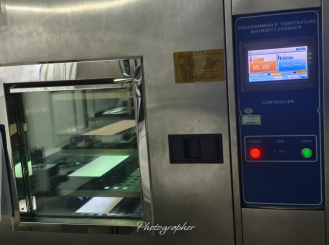
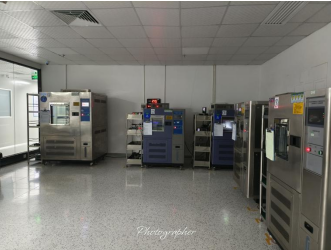
PS:Thermal Cycling / Humidity Testing Chamber
How to Prevent LCD Display Defects
Preventing display defects begins during product design and manufacturing.
Best practices include:
Optimize Mechanical Design
Avoid excessive compression forces on the LCD module.
Improve Backlight Structure
Proper backlight alignment reduces bleeding and brightness non-uniformity.
Control Assembly Processes
Implement standardized torque and pressure controls.
Use Reliable Optical Bonding
High-quality OCA bonding improves display stability and durability.
Conduct Reliability Testing
Comprehensive validation helps identify potential issues before mass production.
Quality Engineering Note on 8D Methodology
At CDTech, every unexpected field anomaly is treated with the highest technical rigor through our standardized 8D (Eight Disciplines) Problem-Solving Methodology. The following case study demonstrates how our Reliability Engineering Lab utilizes advanced failure diagnostics to uncover root causes and continuously optimize our Design for Manufacturing (DFM) guidelines.
Case Study: Proactive Failure Analysis — Mitigating Latent Backlight Artifacts Through Micro-Stress Isolation
Overview & Objective
In high-reliability industrial and automotive applications, TFT LCD modules must withstand rigorous mechanical integration without developing optical uniformity anomalies. A common challenge in slim-bezel, high-brightness displays is localized light leakage.
While edge bleeding is traditionally blamed on external bezel clamping force, CDTech’s Reliability Engineering Lab conducted a Destructive Physical Analysis (DPA) on a high-brightness 10.1-inch module to uncover how micro-level stress during structural integration can induce electro-optical anomalies.
Step-by-Step Laboratory Diagnostics (D4: Root Cause Analysis)
Phase 1: Optical Footprint & Layer Isolation
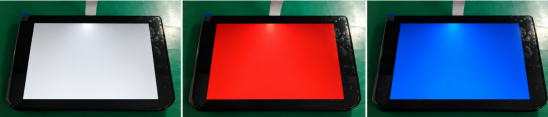
Figure 1 Multi-pattern chromatic uniformity verification under controlled
To pinpoint the exact structural layer responsible for the localized brightness spike, our lab executed a systematic layer-isolation protocol:
· Multi-Pattern Chromatic Analysis: The display module was driven using laboratory optical testing jigs. Solid red, blue, green, white, and grayscale patterns were rendered. The footprint revealed a static, concentrated high-intensity brightness spike localized directly over the edge backlight entry port, while adjacent zones showed dropped lux values.
· BLU De-coupling Verification: The LCD Open Cell was carefully separated from the Backlight Unit (BLU). Illumination of the bare BLU stack showed that the hotspot anomaly remained fully active on the bare optical sheets. This conclusively isolated the root cause away from standard liquid crystal layer cell-gap compression or polarizer distortion.
Phase 2: Microscopic Trace & Topology Inspection
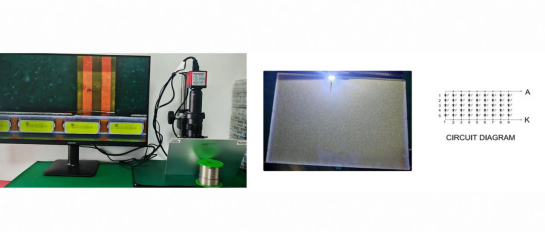
Figure 2 Microscopic fractography of the FPC trace and cross-sectional circuit topology analysis
The investigative focus was shifted to the micro-circuitry of the edge LED light bar assembly:
· Microscopic Fractography: Under high-magnification CCD microscopy, a localized structural fracture was identified at the L-chamfer corner of the Backlight Flexible Printed Circuit (BL-FPC) trace. The copper foil layer within the polyimide substrate exhibited a partial open-circuit rift, leaving jagged, stressed fracture edges.
· Circuit Array Mechanism: Cross-referencing the circuit design topography (5S9P array topology), the partial FPC tearing sharply compromised the copper cross-sectional area. According to Ohm's Law, this localized reduction in conductor mass created a severe resistance spike. This instability directly forced the driving current within that specific parallel loop to deviate drastically above rated engineering specifications. The resulting current surge at the termination LEDs triggered an Electrical Overstress (EOS) condition, causing an intense optical hotspot and local color temperature shift, manifesting as localized edge bleeding.
Phase 3: Root Cause & Latency Replication
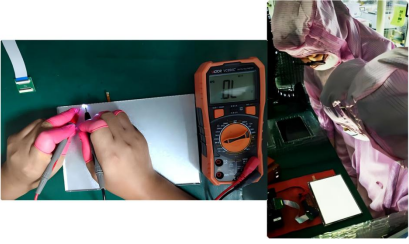
Figure 3 CDTech engineering team implementing corrective handling actions and standardized DFM enhancements
To verify the latent nature of this defect, engineers used a digital multimeter to probe the individual LED diodes along the circuit string. Every semiconductor die was found to be inherently functional and undamaged.
By applying micro-trace pressure to the fractured FPC leads on the laboratory bench, electrical continuity was completely restored, and the edge bleeding artifact disappeared instantly. Releasing the pressure caused the hotspot to replicate immediately.
Engineering Finding on Latency:This failure mode exemplifies a classic latent mechanical-to-optical defect. The root cause was traced back to localized bending stress concentration or steep-angle pulling during the preliminary handling and product fetching phases, creating an invisible, sub-surface internal micro-fissure. Crucially, the sub-surface micro-fissure remained electrically conductive initially, allowing the module to successfully pass all standard factory QA and functional screening. However, subsequent thermal loading, transit vibrations, and structural enclosure assembly acted as mechanical stress-accelerators, causing the latent micro-crack to fully propagate into an open fracture in the field.
Permanent Preventive Engineering Actions (D6: DFM & Process Updates)
To completely eliminate this failure mode from the product lifecycle, CDTech has institutionalized the following Design for Manufacturing (DFM) and process safety upgrades across all production runs:
· Procedural Handling Controls (Updated SOP):
Implemented a mandatory "Anti-Torsion Balanced Coplanar Lifting" protocol across all assembly and integration lines. Standard Operating Procedures (SOP) were updated to enforce a strict zero-tensile-load rule on the FPC tail. Operators are strictly prohibited from applying any pulling, dragging, or asymmetrical stress to the sensitive FPC areas during component movement.
· Poka-Yoke Low-Insertion-Force Jig Integration:
Integrated custom, Poka-Yoke low-insertion-force testing jigs at all final optical inspection stations. These jigs mechanically restrict the FPC engagement and insertion angle, completely eliminating sharp bending or steep-angle twisting during lead engagement.
· Advanced Stress Screening (Reliability Baking):
Added a pre-assembly thermal cycling stress profile to bake and cycle light bars prior to final module bonding. This ensures any latent trace weaknesses or substrate micro-cracks are safely triggered, captured, and isolated inside the factory before shipping.
Why Industrial Customers Choose CDTech
CDTech focuses on industrial and embedded TFT LCD solutions where reliability and long-term supply are critical.
Key capabilities include:
l 1.5" to 15.6" custom TFT LCD modules
l Optical bonding and OCA integration
l High-brightness outdoor display solutions
l Industrial-grade reliability testing
l Automotive and medical application experience
l Long-term supply and customization support
These capabilities help customers reduce field failures and improve display consistency across production volumes.
Frequently Asked Questions
What are the most common industrial LCD display defects engineers should know?
The most frequent industrial LCD defects include backlight bleeding, white spots, ghosting, burn in, dead pixels, and pressure damage. Each affects visibility and reliability differently. Early detection through visual inspection and uniformity testing helps prevent failure. Prioritize panels with strict quality control, such as those from CDTech, to reduce defect rates in critical applications.
How can you diagnose and fix LCD screen bleeding issues?
To identify LCD screen bleeding, display a black image in a dark environment and check for uneven light leakage along edges. Causes include poor sealing or backlight diffusion issues. Fixes involve improving panel assembly, replacing defective units, or recalibrating brightness. For prevention, use high-quality panels and avoid mechanical stress during installation.
What causes white spots on industrial LCD screens and how can you prevent them?
White spots on LCD screens often result from pressure damage, dust contamination, or diffuser layer defects. Prevent them by maintaining cleanroom conditions during assembly and avoiding excessive pressure during handling. Use protective mounting designs and inspect panels under uniform lighting. Early detection helps prevent spread and ensures consistent display quality.
Why does LCD ghosting occur and how can you optimize performance?
LCD ghosting occurs due to slow pixel response times or improper voltage control, causing trailing images. Optimize performance by selecting panels with faster response rates, adjusting overdrive settings, and matching refresh rates to application needs. Testing motion clarity with moving patterns helps fine-tune performance in industrial systems.
What is the difference between burn in and image retention in LCD displays?
Burn in is permanent damage caused by prolonged static images, while image retention is temporary and fades over time. Both stem from uneven pixel wear or charge buildup. Prevent issues by rotating content, reducing brightness, and managing display usage cycles. Proper thermal management also extends LCD lifespan significantly.
How do you detect and repair dead pixels in industrial LCD panels?
Detect dead pixels using solid color test screens to reveal non-responsive or stuck pixels. Compare findings against ISO defect standards to determine acceptability. Minor issues may be fixed using pixel stimulation tools, but severe defects require panel replacement. High-grade suppliers like CDTech typically enforce stricter pixel quality thresholds.
What causes pressure damage in LCD displays and how can you prevent it?
Pressure damage in LCDs occurs from excessive force during installation, tight enclosures, or vibration. It leads to discoloration or permanent distortion. Prevent it by using proper mounting brackets, allowing panel clearance, and applying even pressure distribution. Ruggedized designs are essential for industrial environments with mechanical stress.
How can you build an effective LCD testing and prevention strategy for industrial use?
An effective LCD testing strategy includes uniformity checks, pixel inspection, environmental stress testing, and calibration. Combine this with preventive maintenance like temperature control and periodic inspections. Implement standardized checklists and automated testing tools to catch defects early, ensuring long-term reliability and reduced downtime in industrial applications.
About CDTech
CDTech specializes in custom TFT LCD displays and touch screen solutions ranging from 1.5 to 15.6 inches for industrial, medical, automotive, and embedded applications. Through strict quality management, reliability testing, and advanced manufacturing processes, CDTech helps customers reduce display defects and improve long-term product performance.


