Copyright © 2020-2021 Shenzhen CDTech Electronics LTD. All rights reserved. Site Map Powered by iwonder.cn

display / touch / bonding solutions
display / touch / bonding solutions
Choose the right wide screen LCD monitor with practical guidance on physical parameters, display selection, design constraints, and customization.
A wide screen LCD monitor is increasingly used beyond conventional desktop workstations. Industrial control, transportation systems, retail information displays, instrumentation, smart-home terminals, and vehicle interfaces all depend on screens that deliver clear information within constrained mechanical spaces.
The industrial display market was valued at approximately USD 5.9 billion in 2024 and is projected to continue growing through 2030 as connected equipment, Industrial Internet of Things deployments, and HMI adoption expand. LCD represented the largest technology share of the industrial-display market in 2024, showing its continued importance for durable, application-specific display systems.
At the same time, energy efficiency remains part of display procurement. ENERGY STAR reports that certified monitors are, on average, 7% more energy efficient than standard alternatives. For product developers, that makes brightness selection, backlight design, operating schedules, and total system power increasingly relevant.
CDTech provides standard and customized LCD display and touch solutions for industrial control, medical equipment, smart-home applications, automotive and vehicle displays, instrumentation, communications equipment, and information terminals.
Its product categories include industrial LCD displays, vehicle LCD displays, bar-type LCD displays, and custom LCD display solutions. CDTech also describes a one-stop production capability covering display, touch screen, and optical bonding integration.
A wide screen LCD monitor is an LCD display with a landscape or ultra-wide aspect ratio that provides more horizontal viewing space than traditional square-format screens. It can be used as a standalone monitor or integrated into an industrial machine, vehicle dashboard, commercial terminal, embedded device, or control system.
A wide screen LCD monitor can appear straightforward at the concept stage, but physical and electrical integration often reveals complications. The first issue is that diagonal size does not define the true installation envelope. A display’s active area, outline dimensions, bezel region, thickness, connector position, and mounting points can be more important than its inch measurement.
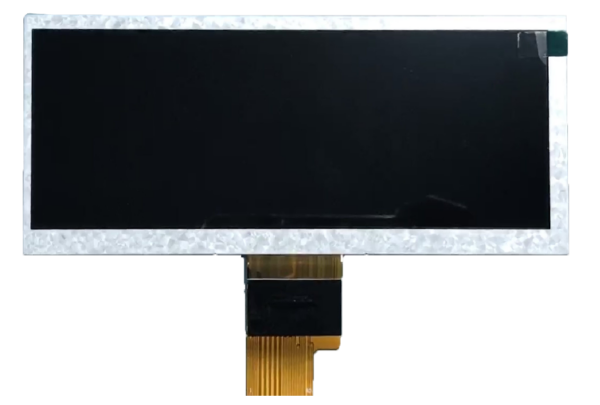
A second issue is content fit. A conventional 16:9 display may look familiar, but it is not always the most effective format for a narrow dashboard, shelf edge, control panel, or instrument face. When height is restricted and horizontal space is available, a bar-type LCD display may provide a more efficient layout for alarms, readings, navigation prompts, or product information.
A third problem is insufficient environmental planning. Brightness expectations vary greatly between an indoor control room, a factory floor, a sunlit retail window, and a vehicle cockpit. A display with a high-brightness backlight may improve readability, but it also affects power consumption and thermal behavior. Viewing angle, anti-glare treatment, touch responsiveness, and cover-glass requirements should be assessed as part of the entire display stack.
A fourth challenge is interface compatibility. The display must be compatible with the host board, graphics processor, cable routing, power design, and intended touch-controller architecture. Teams that select a panel before confirming interface requirements may need to redesign the electronics or mechanical assembly later.
Industrial display demand is being supported by the broader adoption of multi-featured HMI devices, IIoT systems, and smart industrial-display applications.
| Selection factor | CDTech LCD solution | Consumer wide monitor | Standard signage display |
|---|---|---|---|
| Mechanical integration | Can be evaluated for embedded and custom applications | Fixed desktop housing and stand | Fixed commercial enclosure |
| Available display formats | 4:3, 16:9, bar type, square, round, and custom options | Primarily standard desktop formats | Primarily standard commercial formats |
| Touch integration | Display, touch, and cover integration can be combined | Often unavailable or externally added | Available only on selected models |
| Application focus | Industrial, vehicle, medical, smart-home, and terminal use | Office and general computing | Retail media and public messaging |
| Interface flexibility | Can be discussed as part of the project requirement | Usually limited to standard monitor inputs | Usually designed for commercial video inputs |
| Best use case | Embedded products and purpose-built systems | Everyday desktop work | Digital signage and advertising |
Active area and outline dimensions
The active area is the visible screen region, while outline dimensions define the space required by the full module. Buyers should confirm the viewing opening, module width and height, thickness, mounting method, connector location, and cable-routing allowance before finalizing an enclosure.
Resolution and aspect ratio
Resolution must match both the intended content and the host system’s graphics capability. A 16:9 LCD display can suit video, visual dashboards, and general HMI layouts. A bar-type LCD display can be more suitable for long, narrow installations where horizontal information is prioritized.
Brightness and environmental readability
Brightness should be selected according to actual ambient light rather than a broad assumption that more is always better. Indoor screens may prioritize power efficiency and stable image quality, while vehicle, retail-window, or outdoor-adjacent screens may require higher brightness and more careful reflection control.
A production-line HMI displays machine status, alarm priority, shift data, and maintenance instructions in one horizontal interface.
A public-transit information screen uses a bar-type LCD display to present route, destination, timing, and passenger guidance in a limited space.
A laboratory instrument combines live measurement data, menu navigation, operating instructions, and touch controls on a wide screen LCD monitor.
A wide screen LCD monitor may be only one part of a complete product interface. A machine builder might require a main landscape HMI, a smaller maintenance display, and a narrow status panel. CDTech’s industrial LCD display range can be relevant for factory equipment, instrumentation, embedded control panels, and industrial interface projects.
For automotive, fleet, and vehicle-related projects, CDTech’s vehicle LCD display solutions cover display options for on-board applications. The company states that it has passed IATF16949 international authority assessment for its vehicle display category.
For narrow mounting locations, CDTech’s bar-type LCD options include sizes from 2.9 inches to 12.3 inches. These formats can be evaluated for shelf-edge displays, machine interfaces, compact dashboards, information terminals, and specialized embedded devices.
For projects requiring a non-standard combination of panel size, display interface, touch technology, cover integration, or backlight design, CDTech also provides custom LCD display solutions.
At one diagonal, going wider does not add height — it removes it. A 12.3-inch panel is about 249 × 187 mm as 4:3 and about 287 × 123 mm as 21:9, so the ultra-wide version is roughly 64 mm shorter and fits cabinets that a 4:3 or 16:9 monitor cannot enter.
Last updated:
The table is arithmetic with stated assumptions: a 312.4 mm active diagonal (12.3 inch) and the nominal aspect ratio, ignoring bezel, connector and cover-glass space. Substitute your own diagonal; the shape change is what matters, because it decides whether the display fits the aperture the product already has.
| Format | Active width (model) | Active height (model) | Active area (model) |
|---|---|---|---|
| 4:3 | 249.9 mm | 187.5 mm | 469 cm² |
| 16:9 | 272.3 mm | 153.2 mm | 417 cm² |
| 21:9 | 287.2 mm | 123.1 mm | 353 cm² |
| 32:9 | 300.8 mm | 84.6 mm | 254 cm² |
Where the geometry model stops. Two boundaries matter before the format is frozen. First, content that is not native to the chosen ratio is letterboxed or stretched, so the usable area is smaller than the table suggests — check the source material, not only the enclosure. Second, the wider the panel, the greater the angle between the viewer and the far edge: an ultra-wide module used at close range needs an IPS or full-view design, plus a legibility check at the real viewing distance rather than at the centre of the screen.
What to ask for as evidence. Request the active-area and viewing-area rectangles with tolerances, the outline drawing including bezel and connector positions, the viewing-angle specification measured both horizontally and vertically, the interface and timing the module expects, the operating temperature for the exact part number, and a sample at the intended brightness grade. A sample and commercial quotation request is the shortest route to those documents.
Scenario: Industrial control equipment
Traditional approach
A team fits a consumer monitor behind a fabricated machine panel. The enclosure may require extra brackets, the visible screen area may not align cleanly with the bezel opening, and touch capability may require a separate component. Service replacement can become difficult if the original consumer model changes.
With CDTech
A project can start with the intended installation envelope, display size, brightness, interface, touch requirement, and environmental conditions. CDTech’s industrial LCD display options are positioned for applications requiring stability, high brightness, long lifetime, extreme-temperature operation, and touch-and-display integration.
Scenario: Narrow retail or transit installation
Traditional approach
A standard 16:9 monitor is installed in a shallow or narrow space. Excess vertical area may remain unused, while critical text becomes too small or awkwardly positioned. The enclosure can appear oversized compared with the intended information area.
With CDTech
A bar-type LCD format can make better use of horizontal space for product information, navigation, scheduling, route updates, warnings, or pricing. CDTech lists bar-type LCD display sizes including 2.9 inches, 3.9 inches, 4.6 inches, 5.8 inches, 6.5 inches, 8.8 inches, and 12.3 inches.
Scenario: Vehicle or mobile-equipment display
Traditional approach
A product team chooses a visually appealing panel before evaluating mounting depth, vibration, sunlight exposure, temperature, power conditions, connectors, and integration with the vehicle electronics. Revisions are required late in the design process.
With CDTech
A vehicle display project can be assessed according to the complete operational environment. CDTech’s vehicle LCD display category includes 4.3-inch, 5.0-inch, 7.0-inch, and 12.3-inch automotive display solutions, giving buyers a starting point for evaluating size, physical fit, and intended vehicle application.
Start with active area, outline dimensions, module thickness, mounting locations, bezel opening, connector placement, and cable clearance. Then confirm resolution, aspect ratio, brightness, contrast, viewing angle, power requirements, interface type, touch technology, and intended operating environment. Mechanical compatibility should be verified before selecting based on screen size alone.
Choose the aspect ratio based on content and available installation space. A conventional 16:9 monitor is practical for general dashboards, camera feeds, visual interfaces, and video. A wide bar-type LCD display is a better choice when vertical space is limited but a long horizontal information layout is needed.
A bar-type LCD display has a stretched, narrow geometry, while a 16:9 LCD monitor follows the common widescreen format used for video and desktop applications. Bar-type LCD panels are useful for narrow panels, shelf edges, dashboards, transportation displays, and compact equipment interfaces where a traditional display would not fit efficiently.
Yes. A custom LCD project can consider display size, active area, resolution, interface, touch screen, cover integration, brightness, and application environment as one coordinated solution. Buyers should provide drawings, a target application, host-board information, anticipated volume, operating conditions, and preferred display specifications when requesting evaluation.
Optical bonding may be considered when a project needs to reduce internal reflections, improve perceived contrast, support touch integration, or improve the display structure behind a cover layer. It may be relevant for vehicle displays, public terminals, bright environments, and products where screen clarity is important.
Customization still involves practical limits. Buyers must account for panel availability, engineering lead time, tooling requirements, interface compatibility, thermal design, expected quantity, mechanical tolerances, content layout, and supply planning. A highly specialized format may require more development work than a standard-size display.
The right wide screen LCD monitor is selected through physical, optical, electrical, and operational analysis rather than diagonal size alone. Active area, mechanical envelope, resolution, interface, brightness, touch integration, and the actual installation environment all shape the final decision.
CDTech offers standard and customized LCD display solutions across industrial, vehicle, bar-type, and custom-display categories. A specification-driven process can help teams reduce late-stage mechanical changes and improve the fit between the display, enclosure, user interface, and product environment.
CDTech is a Shenzhen display manufacturer established in 2011. It provides TFT LCDs, touch displays, HDMI displays, industrial LCD displays, vehicle LCD displays, bar-type LCD displays, and custom display solutions. Share your target size, resolution, interface, brightness, touch type, application drawings, and operating conditions to begin a project discussion.
By continuing to use the site you agree to our privacy policy Terms and Conditions.